Intel just CRUSHED Nvidia & AMD GPU pricing
Duration
11:08
Captions
1
Language
EN
Published
Oct 7, 2025
Description
This is the stack that gets me over 4000 tokens per second locally. Plaud Web: https://bit.ly/46WTrWD (20% OFF with code “Alex20” on Note & NotePin) Plaud AMZ: https://amzn.to/4mzJt4f 🛒 Gear Links 🛒 💻☕ Thunderbolt 5 external SSD: https://amzn.to/3XqetZO 💻☕ Favorite 15" display with magnet: https://amzn.to/3zD1DhQ 🎧⚡ Great 40Gbps T4 enclosure: https://amzn.to/3JNwBGW 🛠️🚀 My nvme ssd: https://amzn.to/3YLEySo 📦🎮 My gear: https://www.amazon.com/shop/alexziskind 🎥 Related Videos 🎥 🏆 Skip M3 Ultra & RTX 5090 for LLMs | NEW 96GB KING - https://youtu.be/bAao58hXo9w 💻 Smallest RTX Pro 6000 rig | OVERKILL - https://youtu.be/JbnBt_Aytd0 🔧 Cheap mini runs a 70B LLM 🤯 - https://youtu.be/xyKEQjUzfAk 🌙 RAM torture test on Mac - https://youtu.be/l3zIwPgan7M 🚀 FREE Local LLMs on Apple Silicon | FAST! - https://youtu.be/bp2eev21Qfo 🪞 REALITY vs Apple’s Memory Claims | vs RTX4090m - https://youtu.be/fdvzQAWXU7A 📦 Set up Conda - https://youtu.be/2Acht_5_HTo 🤖 INSANE Machine Learning on Neural Engine - https://youtu.be/Y2FOUg_jo7k * 🛠️ Developer productivity Playlist - https://www.youtube.com/playlist?list=PLPwbI_iIX3aQCRdFGM7j4TY_7STfv2aXX 🔗 AI for Coding Playlist: 📚 - https://www.youtube.com/playlist?list=PLPwbI_iIX3aSlUmRtYPfbQHt4n0YaX0qw — — — — — — — — — ❤️ SUBSCRIBE TO MY YOUTUBE CHANNEL 📺 Click here to subscribe: https://www.youtube.com/@AZisk?sub_confirmation=1 — — — — — — — — — Join this channel to get access to perks: https://www.youtube.com/channel/UCajiMK_CY9icRhLepS8_3ug/join — — — — — — — — — 📱 ALEX ON X: https://twitter.com/digitalix #intel #llm #b50
Captions (1)
Would you believe it if I told you that
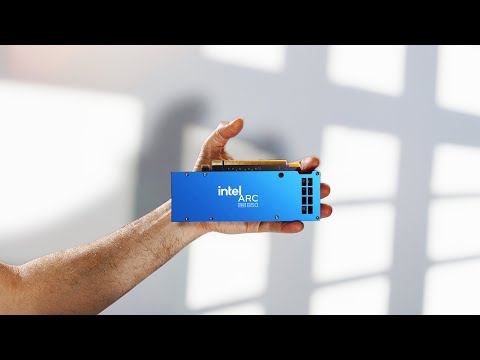
I'm holding a GPU? Yeah. Is this not the
cutest little GPU that you've ever seen
in your life? I love the blue accents.
So, Intel just released these. These are
brand new Gen 5 PCIe. It's not just the
ARC B50 that replaces the A50. This is
the Pro B50, which means, yeah, it can
play your games, but it's meant for
professionals and workstations and home
servers. So today I'm going to throw it
into this rig right here, which is
ridiculous because this thing can fit
into a tiny little build. Maybe I'll do
that one day, but for now, this is what
I have. And it just looks ridiculous
sitting in this giant box. And that's
it. I plugged it into the PCI slot.
Notice that I did not plug anything else
in. There's power cables here from my
power supply that I use in my bench for
other GPUs. This one doesn't need it. It
gets all of its power from the PCI slot.
No extra power cables needed because it
only takes up 70 watts of power to run.
Now, I actually contacted Intel and I
said, "Can you send me one of these,
please?" I asked really nicely and they
did and I'm hoping that they'll do the
same for me for the B60. That's the big
brother. This is the baby. The baby is
here. It's very capable. I already ran a
couple LMs on it. I'm going to show you
right now. And that's what it's really
for. It's for machine learning and
graphics work. But why? We already have
the B580, right? That's the consumer GPU
that I tested a few weeks ago. That one
had 12 gigs of memory. This one has 16
16 gigs of VRAM inside a tiny package
like that is kind of unheard of at this
stage in the game. And the B60 is
supposed to have 24 and with a dual chip
48. So what's so special about it having
16 gigs? Well, the price. try to find
another GPU with 16 gigs of VRAM at this
price. It was announced at Computex at
299, but the price has raised to 3.49,
which is still the cheapest card out
there for this amount of VRAM. Here's
some extra specs you might want to know
about. The three most important things
are the price, the memory, and the
memory bandwidth, which is 224. It's not
the highest memory bandwidth we've seen,
but it's pretty decent. Now, Intel is
comparing this one to the RTX A1000.
They're placing it directly against this
card. Here's their official graphic on
it. Nvidia A1000 has less performance,
less value because it's more expensive.
$426. That's the graphics. And then the
inference machine learning stuff is on
the right. We also have a much higher
score in performance and value. Even
better value this time. The A1000, by
the way, is a very popular professional
level GPU. It only has 8 gigs of VRAM,
this card. So, how can you even compare
a 16 gig card to an 8 gig card? Well,
even at 8 gigs, this card is $100 more.
If you take a card that has 16 gigs, the
A2000, which I don't have here, but let
me know in the comments if you do want
to see that comparison. The A2000 is
over $700. It's almost $800. So,
hopefully that sets the stage for you in
the positioning of this GPU and where
Intel is hoping to enter this market.
They're not ahead. They're quite a bit
behind. AMD already has GPUs out.
Nvidia, obviously, Intel has had GPUs
out, but now they're catching up with
these smaller professional kind of GPUs
that have a lot to offer at a low price.
So, let's take a look at how it does
with some of these models that we have
here. Is this a platinum credit card?
Nope. It's the Plaude Node Pro, my
pocket-sized meeting assistant. I've
started with the Plaude Note and Plaude
PIN over a year ago. They've been my
silent assistants, taking down every
meeting note for me while I stay fully
engaged. And the new Pro takes it even
further. All right, which one of these
people would you rather work with? The
one buried in their notebook or the one
listening, present, and leading? Plot
Node Pro uses four microphones with
noise cancellation to record
crystalclear audio from up to 5 meters
away, even when voices overlap. And
during a meeting, I can pin moments, jot
quick thoughts, and take photos, all
synced into one timeline. Afterward, the
app delivers a structured summary,
highlights key insights, and organizes
to-dos for each stakeholder. Then I use
Ask Plaude, draft a recap email,
brainstorm next steps. This is all
powered by Plaude intelligence. It's
built on top of chatbt and claude. It
remembers context, connects dots across
past meetings, and actually helps me
think through next steps and the meeting
notes. And the hardware, AMOLED display,
auto detects calls versus in-person
meetings, Apple fine my 50 hours of
non-stop recording, 60-day standby, and
64 gigs of storage. My phone stays free,
my battery stays safe, and it's
endto-end encrypted with global
compliance. Your data stays yours. This
isn't just another recorder. It's like a
second brain, an investment in focus and
clarity. The subscription simply covers
the AI that does the heavy lifting.
Plaude Node Pro designed for leaders and
for everyone who wants to become one.
And right now you can get 20% off the
original Plaude Note and Note Pin if
you're just getting started. Check the
links in the description. Right now I
have here the Quen 3 4 billion parameter
model. This is the new one. It's a Q4
quant and it's a pretty small one. It
takes about 3 GB. I like this new
feature of LM Studio that estimates the
memory usage once you have everything
enabled. Let's see if context length
Yes. Yes. Once you increase that context
length, it'll tell you how much GPU is
going to be needed. And right now it
says 10 gigabytes is going to be needed
for this tiny model. If you increase the
contact length to about 50,000 tokens, I
like that feature. Even doing that, we
still fit within the budget of our
memory here. Let's take a look at task
manager before I load that up. And yeah,
there it is. We got 16 gigs. Let me hit
load here. Now, just for those folks
that are curious about the back end
here, we are using Vulcan for this GPU.
We're not using Intel specialized
libraries because LM Studio doesn't have
that support yet. Dedicated memory is
12.8 out of 16. That means we can run
something. I'm going to give it a nice
decent prompt that I like to use. And by
decent, I don't mean like there's an
indecent prompt. I'm sure there's
indecent prompts, but I don't have any
of those. Uh, let's go with this one
right here. It's called design a
scalable web architecture. All right,
here we go. And that's going pretty
nicely. Look at that. We're using 97% of
the GPU. So, Vulcan is working really,
really nicely with this. Vulcan is
great. And look how fast it's going.
Now, I did notice that the fan here is
really blowing out a lot of hot air.
It's not super loud, but it is working
pretty hard. So, if that camera dies
while I'm talking, you know, it
overheated. 51.75
tokens per second for Quen 34B. Let's do
another popular model which is this one.
GPTO OSS 20B by OpenAI. And LM Studio is
telling me that only 23 out of 24 layers
can be offloaded to the GPU. I don't
believe it. I think we can do all. Let's
do all. I'm going to do all 24. Now, I
did set my guard rails to relaxed.
Guardrails is what uh keeps the memory
in check. If there's too much of a
demand from a model, it's going to say
we can't load it. Uh you can turn that
off completely, but I've had my system
crash and freeze and burn. Uh not burn,
but freeze if I did that before. So, I'm
going to set it to relaxed. You can see
up here the GPU estimate is 11.89. And
I'm at context length 4,000. If I push
this, I'm afraid things might start
breaking. So, let's start at 4,000
4096 and see what happens there. Is it
going to load? There it goes. And it
loads. It loads fine. Let's run our
prompt here and see what happens here.
It is a thinking model, so it's going to
do that first. There it goes. 39 tokens
per second. That's pretty good. Now, I
ran my automation script against this
system. And I have a bunch of prompts
here, starting with these really long
prompts. 17,000 tokens, 44,000 tokens.
Those two did not run, by the way. And
then we have a long architecture
enterprise prompt of 1,200 tokens. We
have a 2,300 token prompt and a bunch of
smaller prompts in the 100 range. These
are all programming related prompts
except for this one. This one just says
hi. And I know you love that.
Well, the high prompt never does well.
It's over here. It's the short simple
greeting and it always has this largest
amount of variance. I wonder why. But in
general, you can see that we're pretty
consistent staying between about 35
tokens per second for this one, which is
the long programming project, up to
about 42 tokens per second for the
medium programming prompt. By the way,
this is just a first look at this card.
I'm probably going to do more videos
about it cuz it's interesting. And also,
we'll see what happens when the B60
comes out. But if you're using this
professionally, you're probably going to
be doing something on Linux with it
using VLM.
So yeah, we're going to get slightly
different numbers uh later on. So stay
tuned for those. Now, let's do some
comparisons. Here's M1 MacBook Air. It
does stuff, but it's down here. It's the
purple one. M4 MacBook Air. I don't know
if you're interested in my MacBook
comparisons, but I like to compare a
wide array of machines. In fact, I
recently did a video on all the
different base MacBook Air models. Go
check that out. So, the M1 and the M4
are significantly slower. But if we take
a look at the M4 Max, yeah, it blows it
away. That's my daily driver right over
here. What about this new breed of AMD's
APU? The Ryzen AI 395 Max Plus. Ah, I
forgot the name again. Look at that. GMK
Tech has one in it. The Framework
Desktop has one in it. And yeah, that
does really well. And that's an APU, not
even a dedicated GPU. So, does pretty
well. But here we are. The red one is
still the Intel one. Should be blue in
this chart. Come on, chart. Why didn't
you figure out it should have been blue?
Let's take for example the short simple
math prompt. Intel does 39.9 tokens per
second. Framework desktop 46 and 46.6
from the GMK Techch Evo X2. There's a
few here that the framework refused to
run. Not sure why, but a few of the
longer prompts. This long programming
project, the GMK Tech did 50 tokens per
second compared to 35.9 from the Intel
machine. And here's a medium programming
prompt. 60 tokens per second from GMK
Tech, 56.4 from Framework, and 42 from
the B50. Like I said, this is just a
first look. Let me know in the comments
down below if you want to see more
videos about the B50 and specifically a
comparison maybe with the A1000, a
direct comparison. I haven't had a
chance to do this one yet. But for now,
take a look at my B580 video which is
right over here and my framework desktop
video which is right over here. Thanks
for watching and I'll see you next time.